
Monitor .NETCORE appliations deployed in IIS

Applicare dotnet agent by default will monitor both .NET framework and .NETCORE applications deployed in IIS. If we are not able to see http, sql, webservices data on dotnet agents, then it is possible that the profiler dll is not registered or the instrumentation is not initiated.
1. Add environment variables if it is missing.
Make sure the following system environment variables are set in the machine in which agent is installed.
CORECLR_ENABLE_PROFILING : 1
CORECLR_PROFILER : {AD0AB006-9F79-43F1-B5CF-26768A70E789}
CORECLR_PROFILER_PATH_32 : <Agent_Installed_Path>\Profiler\Arcturus.Applicare.DotNetAgent.Profiler_32.dll
CORECLR_PROFILER_PATH_64 : <Agent_Installed_Path>\Profiler\Arcturus.Applicare.DotNetAgent.Profiler_64.dll

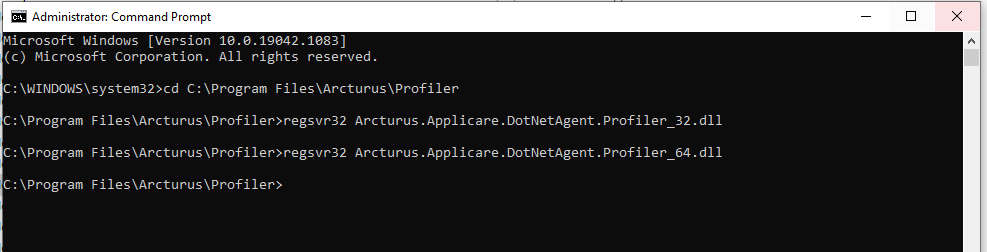
2. Open command window in admin mode and go to the path <Agent_Installed_Path>\Profiler then register the profiler dlls using the following command.
regsvr32 Arcturus.Applicare.DotNetAgent.Profiler_32.dll
regsvr32 Arcturus.Applicare.DotNetAgent.Profiler_64.dll
3. Make sure the .NETCORE application apppool's .NET CLR VERSION is set to "No Managed Code" in IIS.
regsvr32 Arcturus.Applicare.DotNetAgent.Profiler_32.dll
regsvr32 Arcturus.Applicare.DotNetAgent.Profiler_64.dll
3. Make sure the .NETCORE application apppool's .NET CLR VERSION is set to "No Managed Code" in IIS.
4. Make sure both .NET Framework application and .NETCORE application is not deployed on same site in IIS.
Restart IIS after making any changes.
Please sign in to leave a comment.
Comments
0 comments