
Running Applicare in Isolation Mode.

Isolation Mode
- Add the below two lines in the props file inside the <Applicare server> directory.
applicare.isolated.agent=true
applicare.isolated.agent.memory=true
- Then build the agent.
- Copy the “SQL” folder from the <Applicare server> directory and paste it inside the <Agent home>.
- Now go to the below path in the <Agent home>. Path: <Agent home>\sql\ddl\derby.
- The “btm” and “schema” sql file type should be ‘SQL File’. See below.
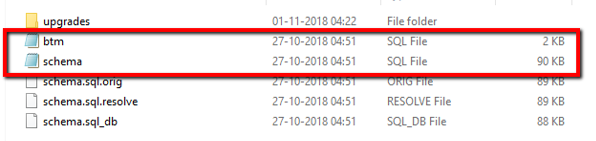
6. If it’s not then please proceed the below steps.
Remove the ‘_processed’ in both the ‘btm’ and ‘schema’ files.
Step 1:
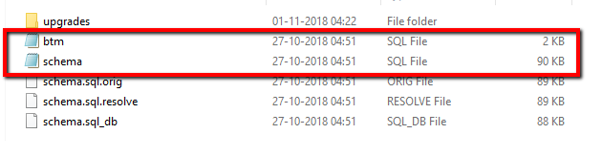
Step 2:
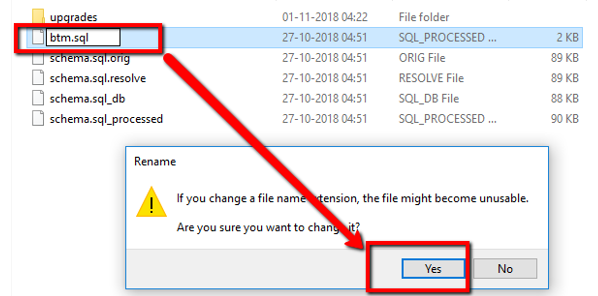
Step 3:
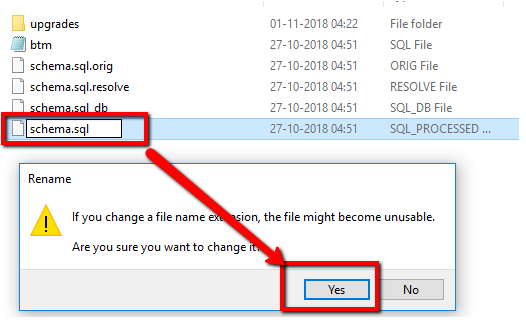
7. Now Start the Applicare server first and agent next.
Note: Before start/restart the agent in isolation mode.
- Before start/restart the Isolation Agent we need to make sure that the Applicare server is running at that time. Because while restarting the isolation agent the settings values will not be available in the Agent Database. So, the agent will request settings data from the server and update it into the local DB.
Please sign in to leave a comment.
Comments
0 comments